I had this question a while back:
I had a lot of AutoCAD block files, and have to drag each one to my tool pallete. I waste a lot of time dragging it for each client. Can I just create the tool palettes from AutoCAD Block Libraries with a few click? And it’s not easy to create them for each client computer!
Setup a Tool Palette and Export it to All Users
Yes. You can create one palette as a standard, and then export the setting into a file (.xtp). Then you can import it to another client. But remember. This setting is pointing to a particular location. Either you put it on a server or local drive. You’ve got to have the same place on every machine!
Another way to do this is by putting the palettes support folder on a server and share them with your users. See the possibility and ability to lock the palettes here. But some people response said this is quite buggy and not as smooth as enterprise CUI.
Manage the Block File Library
I have another workaround: why don’t you put all your block in the same category into one file?
What is the advantage? You have less file to manage. It will be easier. This is another good use of it: creating a palette from the Design Center.
Press [ctrl] + 2 to open design center. If this is the first time you use Design Center, it should point to sample files. If not, you can open the folder in
X: > Program Files > Autodesk > YOUR AUTOCAD VERSION >Sample > DesignCenter
Design center works as your window explorer.
Right click on one file, for example, welding.dwg. Expand the file by clicking + icon on the left side of the file. You will find blocks as it’s sub-object. Right click, then choose create tool palette.
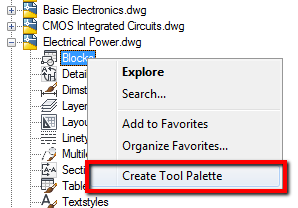
Your palette will be created and added. It is easier, especially if your user maps a network drive. You don’t have to set an exact target for each client!


