Do you often need to send your AutoCAD drawing files? Sometimes you left your reference file behind? Sometimes I receive an AutoCAD file that referenced to other file, but they didn’t send the reference file. Or they burnt all the files in to a cd, but the reference paths are broken. Not to mention other problems like they don’t include the plot style table, custom fonts, etc. You can pack all reference files, and all related files into a single zip file easily.
There is a tool in AutoCAD that can be very useful for this situation: eTransmit. I believe that almost all CAD applications have similar tool. But It looks like many AutoCAD users are not aware about eTransmit.
eTransmit will pack your related files into a transmittal package. Includes your reference files, plot style table, reorganize your reference path, material textures, data link files, etc.
You can open eTransmit by accessing AutoCAD menu: File>eTransmit.
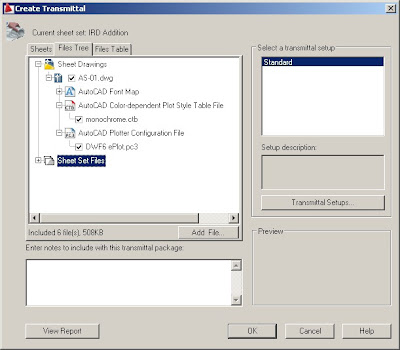
Click Transmittal setup and click modify. You’ll see that eTransmit has a lot of option that you can use.
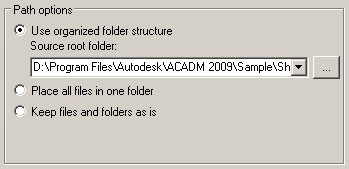
You can change path option, so all your AutoCAD files will be included in one folder. So you don’t have to worry your path will be broken.
Or you can simply bind it all to master file. Some cad users are not familiar with external reference, so sometimes bind them all in master file can be a good idea.

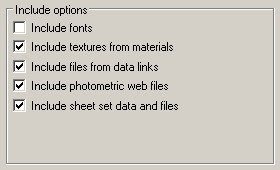
You can also choose what types of file to be included. Sometimes you don’t want your partner to have excel file in data links. Or may be they already share same fonts or material textures.
If you will send this file to your partner using old version of AutoCAD, you can choose to convert it all first.

If you use Sheet Set, you can create the whole projects drawing to a single zip file with a few mouse click!


Gday Edwin,
Looking for a way to batch insert image file addresses to hyperlink attributes of cogo points.
Basically I would like to bring in the cogo points via “insert” method using text file which has the addresses for hyperlink as a column in the input file.
Result should have cogo point with the address of image as hyperlink in attribute of cogo point object.
As the input processes hundreds of point data, this is obviously not economical to do as a manual process.
I think the only way to achieve this is to write a routine as code (vbnet?) to batch process file?
Any help is appreciated.
Readers should be aware that using the Bind function doesn't always work if one of the Xrefs has an error in it. To be safe, use the Audit command and choose to repair errors on each Xref before trying to bind Xrefs.