
Rendering with AutoCAD? Why not. It can produce very nice result since 2007. Autodesk change the render engine with mental ray. It’s not exactly the same with mental ray in 3ds Max, but it is good enough.
Every image in this post is created with Revit, and rendered with AutoCAD. Isn’t Revit also has mental ray? Yes, and it’s good too. I created this model in Revit 2008, when Revit still use Accurender. Rendering it in AutoCAD, is a lot better than doing it in Revit before.
Let’s see more of my renderings.
This model below is from the getting started tutorial in Revit. I exported it to DWG, redefine all the materials, and render it. I only use sunlight, no other light is defined. The smooth shadow and indirect lights look very nice.
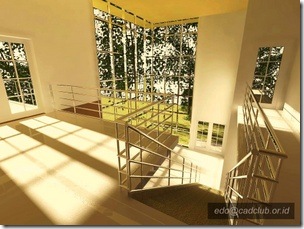
Let’s take a closer look. See the railing? The stainless steel material look realistic enough to me. The reflection on the door glass look nice too.

This is another one.

It can produce very nice photorealistic rendering. If you don’t have 3ds Max, don’t worry. Render your model with AutoCAD. Why not?
If you want to try it by yourself, you can try setting your sunlight in this tutorial. It is easy and produce quite nice rendering!


you are one of the best teacher in the world
you say ever thing in detail very easy to understand
thank you for your articles
write to you sometime later
hello sir edwin…can you post a tutorial on how to create realistic rendering for stainless steel…thanks in advance sir…im from philippines
hi Edwin
ahm can i ask u some questions about rendering?whats the technique how to use lights in autocad 2011 thanks
hI…AutoCAD 2011 user here…. been working on my rendering skills since i have yet to learn 3d max… been working on a couple of projects.. im striving to achiev a photo realistic render…. but always fall short… do i need to get a mental ray standalone for this one? also when converting JPEG file, my render seemed to loose clarity based on the outcome. help
Hi Edwin
Thanks for your swift reply. Just wondering if the trees (exterior) scene is a JPEG image imported to the Background of the window. Do you think it will work? Will "Sky Background and Illumination" be forced "Off"?
And as a matter of interest. How long did each rendering take you?
Thanks.
I think you can use JPEG image for trees and set transparency/cutout map using the same image. If you use that method, sky background and illumination will still work.
You may want to check this one: https://www.cad-notes.com/2011/04/autocad-rendering-ti…
The rendering took about 3 hours, but it was a small resolution. Not for presentation, but for testing purpose only.
Thanks very much.
Have a good day.
Hello Edwin
Thanks for showing your works.
I wish I can master AutoCAD render like what you did.
Take the example of the 2nd image. The landing looking out to the windows and see the trees outside. Apart from Sun is on, do you also have "Sky Background and Illumination" on as well please?
And do you actually have glass material inside the window frame?
Thanks.
Hi Nick,
I'm glad that you like it :) Yes, I had sky background and illumination on. The glass is actual glass material, in fact the tree is a real tree model.
Hi Anderson. They are my old renderings and I have lost the files. The configuration is not that complex. I've just use the solar lighting, turn on the global illumination, turn on final gather… and pray for a good result :)
Hi cold you show me the configurations of Render, i'm from brazil and i do 3D projects, i'd like a photorealistc images on final render
thank's
good work
Kudos.Good work