May 24, 2013

Creating Angular Dimension Larger than 180 deg

Can we create angular dimension larger than 180 degrees in AutoCAD?
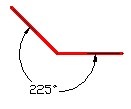
dim

Well if you see the recorded animation below, you can’t do that by selecting lines, obviously.

ang01

But you can create it in AutoCAD using dimangular by selecting line’s vertex.

From your AutoCAD ribbon (or toolbar) activate the tool. OR type DIMANGULAR then [enter], you will see on the command line these options:

Select arc, circle, line, or <specify vertex>:

Press [enter] to specify vertex. Now, select the vertexes.
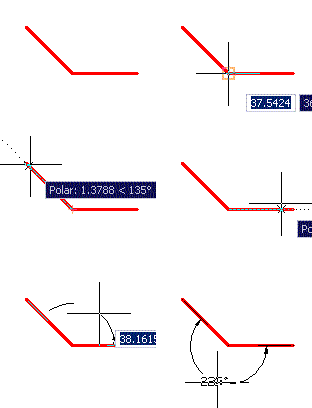
vertex

You need to use some option, but yes, you can do it!

If you are interested to see more tips, see our 100 AutoCAD tips compilation here.

Advertisement


You might also interested to

About Edwin Prakoso

Edwin works as an Application Engineer in Jakarta, Indonesia. He has 4 years experience in building industry, then start to work for Autodesk reseller.
He is certified as Revit Architecture 2010 certified professional and AutoCAD 2013 certified professional.
He loves sharing his experience and starts to blog on CAD notes. Now using CAD is more to a lifestyle for him than working.
You can reach him on twitter @CADnotes. You can also connect with him on LinkedIn. If you prefer email, reach him at edwin.prakoso@cad-notes.com.

  • Walt Dotter

    I’ve been fighting this for 20 years

  • MAHMOUD

    VERY NICE

  • wd miller

    Thanks. I spent too much time trying to figure this one out!

  • http://www.google.com surya

    thank you very, very much

  • Pingback: The Best, the Rest, the Rare: 100 AutoCAD Tips You Should Know | CAD Notes

  • Mocoroh

    Thanks, man.

  • Fahad Kamal

    good

  • Fahad Kamal

    very good. thanks

  • suranga

    thanks dear continue your site