I don’t like when I receive AutoCAD drawings with the properties overridden to other than ByLayer. It’s a bit hard to distinguish between layers in that drawing. I usually can determine objects layer when I see their color.
There are many ways to change them back to ByLayer. One popular method is to select all objects and set the properties to ByLayer or using Match Properties.

But it will be a problem when it has blocks that also have it’s property overridden.AutoCAD actually has a very handy tool for this purpose: SETBYLAYER.
You can type it in command line/ dynamic input or accessing menu modify>change by layer. Or you can find it in home tab> modify panel. Expand the panel and you should see this command like below.
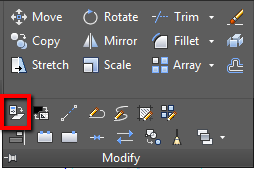
You can see that this tool will change these properties to ByLayer:
- Color
- Linetype
- Lineweight
- Material
By default, this command will change all those properties. However, you can choose only specific properties to change. For example, you want to change the color and lineweight to bylayer, but you don’t want to change the others.
You can also see that this tool can change ByBlock to ByLayer. And you can also change objects inside blocks!
Command: SETBYLAYER
Current active settings: Color Linetype Lineweight Material
Select objects or [Settings]:
Specify opposite corner: 167 found
Select objects or [Settings]:
Change ByBlock to ByLayer? [Yes/No] :
Include blocks? [Yes/No] :
167 object modified.
This is a great tool to implement your CAD standard to a drawing. It won’t take long to restore all properties to ByLayer!


okay, you just spared me about 30 minutes for every drawing I have to work with which easily means you will spare me weeks of work in the future.
So thank you soooooo much!!! Do you have more tips and tricks like this one?
sir
How to “replace object color” in all different AutoCAD drawings in a folder without opening all drawings..
You can try using Scriptpro to run a script on multiple drawings at once. I’ll publish something about this soon.
I’ve used AutoCAD since R14 as a Mechanical Draftsman and never knew about the “Setbylayer” command (or perhaps had forgotten about it). Thank you for this tip! It has helped save hours of work today!
Hey, that´s really neat, a bit late but hope get some response anyhow. Well, the thing is somehow I need to change all blocks´ components to ´BY BLOCK´. is there a way to set them altogether at once, just like you happened to mention above? only a bit different…hehe
thanks
Hi Martin,
Unfortunately, I don’t think there’s a feature in AutoCAD that does that.
omg if only I could have known this 6 years ago. I as well have spend many an hour "fixing" architecutral files to use as XREFs. This saves me tonnes of time, thank you so much.
that has just saved me 3 hours to change Architects drawings – I owe you about 20 working hours a month. thank you!!
Digo… 2010…
En Acad 2110 se encunatra igual x línea de comandos! y en Modify. =)
Hahaha, well, it's sold hours so I guess it's not too bad, but those were some really BORING hours. :)
Thanks again.
You know… the first thought that came to my head was "You've got to be f#$%$g kidding me!!!!"
LOL, I don't know how many hunreds of hours I've spent on this one project, exploding blocks as much as 10 block layers deep, just to be able to set them all to by layer.
Thank you, thank you, thank you, THANK YOU for this tip! :D
I'm glad you find it useful :) So now you can use that hundreds of hours for something else fun!