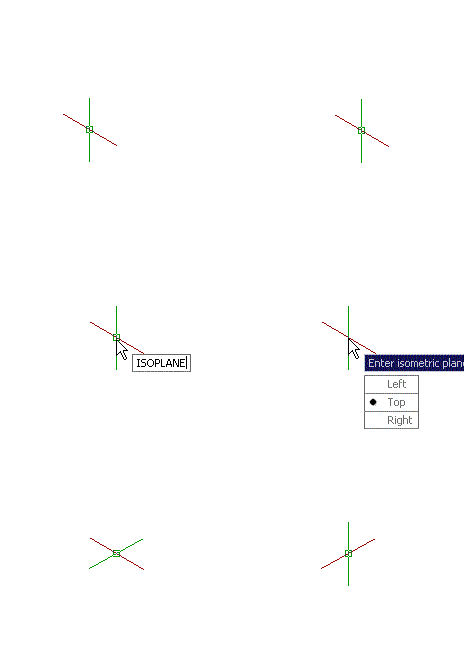
If you work in plant industry, then you might need to draw isometric drawings. If you use AutoCAD, you may wish you can do it easily. You can.
It’s not a 3D drawing, but 2D drawing by simply change your drawing orientation. You can do it by using snap, then change it’s style to isometric.
Command: SNAP
Specify snap spacing or [ON/OFF/Aspect/Style/Type] <10.0000>: S
Enter snap grid style [Standard/Isometric] <S>: I
Specify vertical spacing <10.0000>:
You can change your plane by typing ISOPLANE [enter] then select left, top, right.
In AutoCAD 2015
In newer AutoCAD version, we have ISODRAFT option. If you use AutoCAD 2015, you can access the option in drafting settings, AutoCAD status bar.
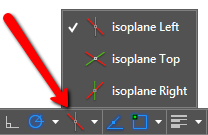
This will help you to quickly switch to isometric drafting mode, the icons really help!


Is it possible to receive your comments on FB?
Are you referring to Facebook comments? We don’t use it for this site.
Hello everybody to complement this tutorial I share you a useful video
https://www.youtube.com/watch?v=wQ7krm4GjSk
Thanks Edwin for the isometric tip, is there a way that the text can be on iso mode as well as I do remember that it can be done, how do you do it for text, dimension and notes too!
Regards,
Tony
Hi Antonio,
You can read about isometric text and dimension here: https://www.cad-notes.com/autocad-isometric-text-and-dimension/
In Autocad 2013 you can easily type "ISO+Enter" in the command line and the snap turn to Isometric, type "STD+Enter" and the snap go back to standard snap.
Alternatively, you can use the SNAPSTYL command, changing the variable value to 1.
As said, you can change your plane by typing ISOPLANE, but it can be done faster by pressing "F5" key.
To came back to the default, use the SNAPSTYL command again and change the variable value to 0.