I had this question a few days ago: can we add tags to Revit walls?
This question come up because the user always automatically tag his doors and windows. Door tags can be placed automatically during door placement. But not for walls. For many type of objects, we need to add tags manually.
You can add tags or keynotes for your wall. The tools are in Revit ribbon>Annotate tab>Tag panel. For tagging your wall, you can use tag by category.
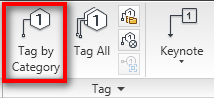
Tag all (not tag) can tag all objects in specified categories. However, wall is not a category you can choose using this tool.
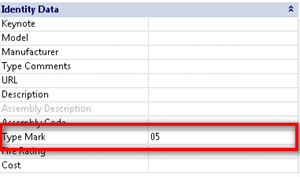
Wall tags will show the value of your walls type mark. You can change it in the walls type properties.
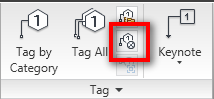
If you do not want to show the wall type in your tag, you can show the material tags. The wall type should have the same interior and exterior finish. However, I know some engineers want to tag their wall finishes, not by the wall types.
If you want to add a material tag, you can find material tag in the same panel.
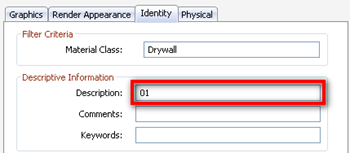
The value shown in your material tag is the material description that you use for the wall.
All of the tags will show your type properties.


[…] O que é uma etiqueta de parede? […]
I VERY HAPPY BUT I NEED YOU TO HELP NOTES OF CIVIL ENGINEERING ESPECIAL IN FOUNDATIONS AND ITS TYPES
Nice tip, but for some reason, when I input data into the type mark field of any wall, and then later on tag it, the tag does not display what I wrote. Is there anything else to wall tags you could share so as to find out why my wall tags don't work?
PS
I just found out that the reason is the file template I am using, cos I tried with the default template and the issue is not there. So now I need to find out what's wrong with my template, because it is the one I need to use and I need to fix the bug with not showing the wall tags.
Any ideas anyone?
I think in your custom template, you use custom wall tag or different tag. It may use different field for wall properties. To make sure, can you send the template file so we can examine it?
Thanks. but it's ok now. There was apparently something wrong with the family itself – the wall tag family that is, so it's cool now.
Thanks and keep up the good work!
Hi Edwin.
I am a precast engineer. Revit is not very useful in our field, but recently we see a lot specs calling for it. I now the basics and have done a few courses, but want to ask you a question regarding wall tags. On our drawings (erection drawings) we have piece marks for every panel. This mark can repeat if the panels are identical i.e., it is not unique number. Is there a workaround of creating a custom tag that I can apply to my panels. My long shot will be to have two entries, one will be the piece mark (can repeat if I want to) and one that is unique number (control number, consecutive number).
Thank you in advance.
Hi Boyantcho,
If I get you correctly, your wall has panels and you want to tag each panel, right?
What version are you using? If you already use Revit 2012, have you tried to divide it to parts? You can tag part separately.
Yes, I am on 2012 and I have broken the wall to individual panels. How should I apply the tag that you are implying. Thank you for the quick response.
You can load part tag and use it with tag all or tag by category. See image attachment, it's the part tag. You can find it below annotation folder in Revit family library.