Let us discuss more about the AutoCAD 2011 enhancement. We have discussed about the AutoCAD 2011 hatch enhancement, and now we are going to discuss about AutoCAD 2011 polyline enhancement. Like the hatch enhancement, there is nothing you can’t do in AutoCAD 2010. There is nothing different with creating polyline, but you can modify polyline much easier in AutoCAD 2011. If you use many polyline in your work, you may love it.
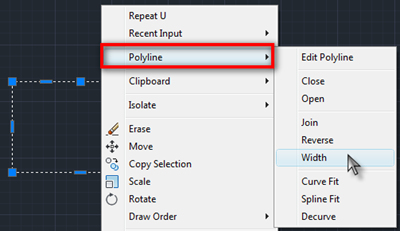
Polyline in Contextual Menu
When you are selecting a polyline (not multiple polyline), right click your mouse, you can find additional menu in AutoCAD 2011: polyline. There are several polyline modification tools here. I don’t use polyline that much, so honestly it doesn’t quite interest me. But probably you will find it useful.
I’m trying to look for polyline in contextual menu when I selected a line. I’m kind of disappointed that I can’t find it. I often draw several lines and join them later as a single polyline. When PEDIT find that it’s not a polyline, it will offer me to convert it to polyline. Sometimes this method is faster. It looks like we still need to use PEDIT command.
Using Grip Control
If you selected a polyline, you will find additional grips in the polyline segments. This control grip is similar with the one in hatch editor.
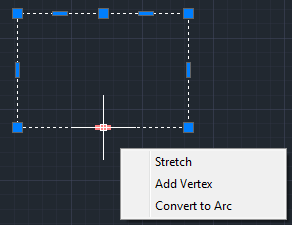
You can stretch, add vertex… and this one is new: convert the segment to arc! Just like using hatch control grip, you can cycle between those tool by pressing [ctrl]. If you often use polyline, I believe you will like it very much. I remember how many step we need to go through just to add a vertex. And how we can modify a segment and change it to an arc. You can also pick a polyline vertex and do some vertex editing using the similar way.
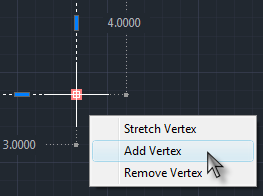
See animation below to see how it works.
Editing polyline is easier in AutoCAD 2011, but since I don’t use it that much, I can live without it. How about you, do you like this enhancement?


A task came across my desk and I was asked to Trace the Old maps, Streets and Piping.
using ACAD 2015, I thought that I was smart and traced it with Polylines.
Now this was not all that bad until I had some changes to make, I noticed that in a few of the Polylines that were edited had about a Thousand Vertices…?
I Know that I can Add & remove vertices one or several at a time But I ended up having to replace the whole line segment… The One by One method was Killing my time.
(Do you have any idea of what I am speaking of…?) And if so How to remove a Hundred Vertices at one time…?
Any Input would be appreciated.
Thank you,
EJK
It looks like your drawing was originally created using AutoCAD Map or Civil 3D. Have you tried using OVERKILL tool to simplify the polylines?
Edo,
Thanks for the update on polylines in 2011. I do use polylines somewhat and I'm looking forward to these enhancements.
Keep up the good work you've been doing. I always enjoy reading your blog!
Hi Eric,
Thank you for stopping by :) I'm glad you like the information. You have a great blog as well!