This question appears in our local forum. Is there any way we can create an arc by defining the arc length? There is no direct way to do this. There are some methods that seem to allow you to define length. For example start, center, length. But this is defining the chord length, not the arch length.
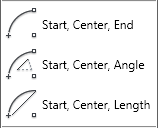
There is a suggestion to calculate the angle using a simple mathematic calculation, comparing the arch radius and arch length. After you get the angle value, then you can draw it. But it is not easy.
One of our member, Ast, suggest a better solution: draw the arch, then modify it using lengthen tool.
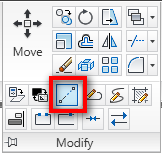
Lengthen tool allows you to define the object total length, including an arch. Select the total length option, then type the distance you want.
Command: LENGTHEN
Select an object or [DElta/Percent/Total/DYnamic]: TSpecify total length or [Angle] <1.0000)>: 1000
Select an object to change or [Undo]:
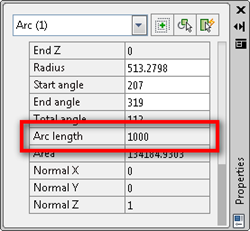
Now if I try to inquiry or see the arc properties, I will see the arch has the exact length I wanted.
I never need to draw arch by defining its length. Does anybody know why we would need to do that?


We have a problem with spiral ramp in specific gradient. We know how long ramp it should be is but we are not sure when it is round or curve. Do you have another solution to solve this problem? Thank you
Salut Mas turtornya,, versi B.Inggris mantap,,,, Ingin seperti mas tp gak bisa bhs Inggris,,
Mas tutor bahasa indonesianya donk,,,