There are some more nice enhancements in Revit Architecture 2011. Before we continue to some considerable major enhancements, let us see some small enhancements that we can see in Revit Architecture 2011.
Temporary Dimension
Temporary dimension is the dimensions that appear when you select an object. This dimension allows you to define the object distance by overriding the dimension value.
Controlling Temporary Dimension Size
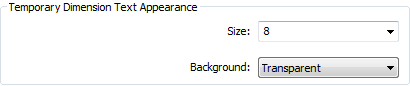
Before Revit 2011, some of us might have a problem with the temporary dimension size. It can be too small for some of us. No, I’m not referring to the user age. But when we use very high resolution, the dimension can looks so tiny and hard to read. Now we can change the dimension text size to the size that is more convenient to read. We can change the temporary dimension size by accessing Revit option.
You can open the option dialog box from Revit application menu> option. The button is at the right bottom of the drop down menu. In graphics tab, you can see temporary dimension text appearance.
Persistent Witness Line
I’m not really sure what this new feature is called. The witness line is the temporary dimension reference to a certain object. In the previous version, we can drag the witness line to refer to another object than the default. But when we deselect the object, the witness line refer back to default objects. Now the witness line will be maintain to our preferred object. However, Revit only remember this position in a session. After you close Revit and open a new session, witness lines will point back to the default reference.
Custom Elevation Tag
This is also minor enhancement. Now elevation tag is saved as external family file and you can modify it using family editor. Previously, elevation tag is a system family and we can only change the parameters without able to add our preferred geometry.
System families are saved within Revit files, and controlled by parameters. We can’t save it as external file and can’t edit it in family editor. Other samples for system families are: walls, roof, floor families.

You can then apply your own elevation tag by changing the setting in manage tab>additional settings drop down>elevation tag.
Sheet List
In Revit 2010, we have drawing list. In Revit 2011, we use sheet list. It is pretty much the same, but not only the name has changed. The difference is, now you can add a sheet in the sheet list even you don’t actually have it.
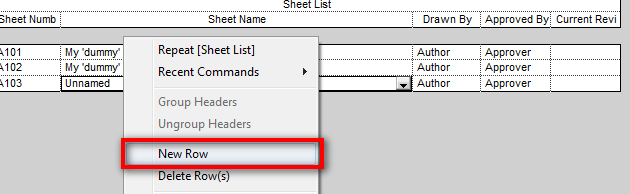
This can be useful if you don’t create every drawing in Revit. You might have the detail drawings in AutoCAD or LT, for example. You can create a dummy sheet here, and the sheet is listed in your sheet list.
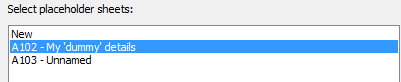
You might also want to list all required drawing and the create the sheets later. If you already have the sheet name on the list, when you create a new sheet, you can see the available sheet name as placeholder sheet.
You can also change the view name later in properties palette.
Sheet Guide Grid
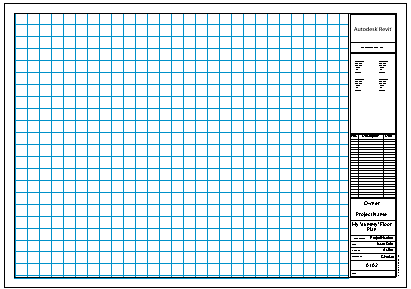
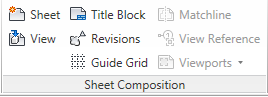
Placing views in sheet is not easy. We need to align it, stretch it, align it again… etc. In Revit 2011, Autodesk introduce guide grid. You can place the grid by using the tool in view tab> sheet composition panel.
This is not a cure, but at least it can helps to align our views easier.
3D Alignment
In Revit 2011, now we can easier to align objects in 3D view. You can do it before, but only as what you do in 2D views. For example, you can only select wall sides, but not wall top face. Now you can do it easily in Revit 2011.
Structural Tools
Yes, we are talking about Revit Architecture. Now you can have some structural tools in Revit Architecture too!
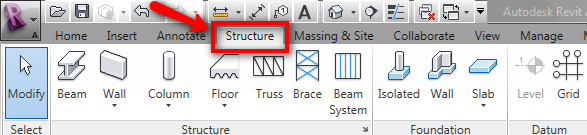
And if you look in modify tab, you can also see ‘cope’ tool for structural beam.
More New Features Later
There are more new features in Revit Architecture 2011. We will discuss about them later. And probably how we can use them.


