• Home
  • Training Books
  • Subscribe to Our Email Newsletter
  • About
    • Contributors
    • Feedback
    • Contact
    • Privacy policy
    • Cookie Policy
  • Bahasa Indonesia

CADnotes

CAD Tutorials and Best Practices for professionals and students

  • Featured
  • AutoCAD
    • AutoLISP
  • Revit
    • Revit Architecture Basic
    • Revit MEP Basic Tutorial
  • Inventor
  • MicroStation
    • MicroStation Basic Tutorial
You are here: Home / Revit / Revit Section Line Disappear in Large Scales

Revit Section Line Disappear in Large Scales

May 5, 2010 by Edwin Prakoso 4 Comments

When you change the floor plan scale to a scale higher than 1:100, you might see the section lines disappear. To allow the section line to appear on a larger scale, we need to change a view parameter.

Open your floor plan, then select the section line. In the Properties Palette, find parameter Hide at scales coarser than.
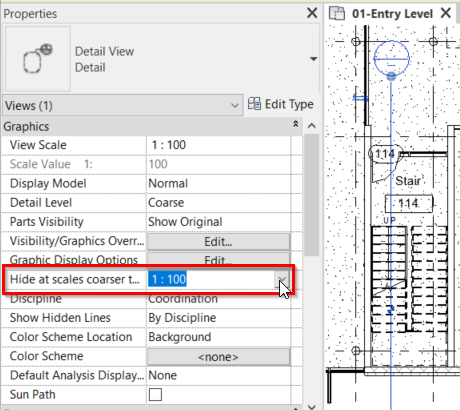
By default, the value is 1:100. That’s why the section line disappears when your floor plan is set to a scale smaller than 1:100. Change it to a preferred scale and review the floor plan.

See the video below to see how to change the parameter.

Share the knowledge:

About Edwin Prakoso

I work as a Sr. Consultant in PT Cipta Satria Informatika. I've been using AutoCAD since R14 and Revit since Revit Building 9. I occasionally write for AUGIWorld magazine and I am also active in Autodesk discussion forum. I'm a member of Autodesk Expert Elite, an appreciation for individuals who give contributions to the Autodesk community.
Connect with me on twitter or LinkedIn.

Filed Under: Revit Tagged With: section view properties, view scale

5 1 vote
Article Rating
Subscribe
Login
Notify of
guest

guest

This site uses Akismet to reduce spam. Learn how your comment data is processed.

4 Comments
trackback
Revit section Lines Disappear when duplicating views and changing scale – Vast
4 years ago

[…] Here is the autodesk article Section Line disappears when changing the plan view scale in Revit that then points to this article Revit Section Line Disappear in Large Scales. […]

0
Reply
Clement Essien
Clement Essien
4 years ago

Thanks a lot….

0
Reply
trackback
Revit section Lines Disappear when duplicating views and changing scale · Vast
6 years ago

[…] Here is the autodesk article Section Line disappears when changing the plan view scale in Revit that then points to this article Revit Section Line Disappear in Large Scales. […]

0
Reply
Nader
Nader
12 years ago

Thank you

3
Reply
wpdiscuz   wpDiscuz

Featured

One AutoCAD, Seven Specialized Toolsets

AutoCAD 2019 has been released, with a big change. This is the special announcement Autodesk has been teasing you in the last few days. It’s not only AutoCAD 2019. You also get 7 specialized toolsets!

Recent Articles

  • AI-Powered Rendering Now Available in Forma Board
  • Autodesk Forma Is Not The New Name For ACC
  • Placing Views on Sheet Efficiently with Saved Position

Advertisement

New on CADnotes

  • AI-Powered Rendering Now Available in Forma Board
  • Autodesk Forma Is Not The New Name For ACC
  • Placing Views on Sheet Efficiently with Saved Position
  • Autodesk Forma: One Platform to Rule the AEC Lifecycle
  • Accessing Autodesk Docs Files from Windows Explorer

Meet the Authors

avatar for
avatar for
avatar for
avatar for
avatar for
avatar for

Get Connected

CADnotes on FacebookCADnotes on InstagramCADnotes on TwitterCADnotes on YouTube

© 2009 – 2026 CADnotes · Feedback · Privacy Policy · Become an affiliate

wpDiscuz