If you join some discussion group, you may see many problems are simply because the AutoCAD system variable has changed. The most common variables that cause confusion are FILEDIA and PICKFIRST. There are some more, but those two are very common.
Why this happens? It can happen when you use an AutoCAD command (mostly on AutoCAD based vertical products) and cancel it before it finished. Or the command ends prematurely somehow. It can also caused by some AutoLISP program that change the system variables but not return the original value. If you often download AutoLISP from internet, this problem can happen. There are hundreds of system variables, so you would better backup your original configuration before trying a new LISP. If something went wrong after using that LISP, you can restore the variables easily.
There is a tool that we can use for this purpose: system variable editor.
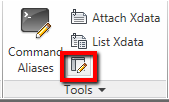
This tool is a part of express tools, so you need to make sure you have express tools installed. System variable editor is for editing your system variables easily. You can see the variable, read the description, compare the initial and current value. Very useful if you play with system variable a lot. But see in the red rectangle: you can save all the variables and restore it later!
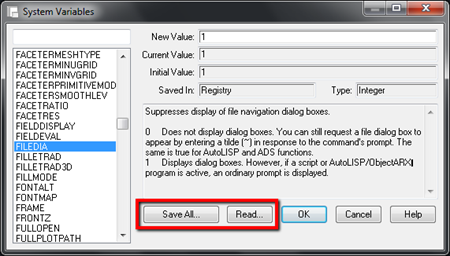
If your AutoCAD works fine, backup your system variables now!


I got acad.lsp file which keep changing the autocad variable on all pc on the network, how I can get rid of this on all pc’s , noted that I access autocad drwings and files from shared network not on my local disk drive how can delete these virus from there as well.
regards,
Hi Ahmad,
Probably this can help? http://knowledge.autodesk.com/support/autocad/troubleshooting/caas/sfdcarticles/sfdcarticles/How-to-remove-fas-and-lsp-virus-from-a-server.html
You might also want to read this: http://knowledge.autodesk.com/support/autocad/troubleshooting/caas/sfdcarticles/sfdcarticles/How-to-detect-and-remove-the-Acad-vlx-virus-s.html
Thanks man, it worked out.
Thanks it works
DANGER: The "Save" option is buggy. It does not store the real numbers with enough precision. When the saved file is read back into Acad with the "Read" option then most likely some of the sysvar-values will get corrupted. Especially dangerous is it with any angles that are stored in Rad in the exported file.