Have you ever find your AutoCAD doesn’t feels right when you select objects? You select them, press delete, move, mirror, etc the objects still stay. You select the objects, the layer toolbar still showing current layer. And after you select objects, the properties palette may still showing no selection.
I see this problem occurs many times, and I’m not sure how, even AutoCAD LT users also have this problem. It is not common that system variables just changed like that. Usually some poor programming routines change the system variables and don’t restore it back. AutoCAD LT doesn’t support programming, and I’m sure the user doesn’t use any macro, so it must be something else cause it.
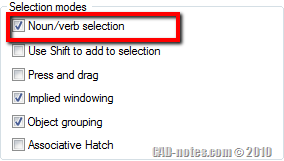
It is a very simple problem. What’s described above is showing that you are using noun/verb selection. You select the object first, then you activate the modify tool. The system variable that control this has changed, so it won’t allow you to do that. The only way you modify object is activating the modify tool first, then select the object(s).
To restore the system variable, you only need to type PICKFIRST in command line then change it to 1. Or you can open AutoCAD option, in selection tab, activate noun/verb selection.
If your AutoCAD working fine now, I strongly suggest you to backup all system variables and use it in emergency situation. Have you done it?
Read how you can backup AutoCAD system variables here.


Good Job…
Nice work, it helped me a lot! Thank you so much!
Really helped me, thank you!
it heleped me
really thanks
Thank you very much Sir. This really helps me a lot.
Thank you.
I’ve had this happen once before but I had forgotten how to fix it.
Great job. It helped
Thanks
Thanx google for help me. i was solved my problem with google through. once again thank you very much.