When we insert a block with attributes, AutoCAD will ask you to give new value.
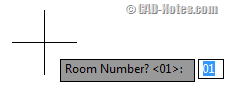
Do you ever wish that you can insert your block without AutoCAD asking you the question? You probably wonder… why do we want that?
Let’s see our coordinate labeling tutorial here. We created the block definition using field, so the value will be updated automatically. When we move it, or insert in new location.
By having AutoCAD asking the user, The field can be accidentally removed.
Try to insert it and type a text when AutoCAD ask you the question. The coordinate label doesn’t work anymore.
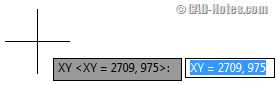
So we want to insert it quietly.
How can we do it? Very easy.
Preset Mode
When you create a new attribute, make sure you check the preset mode. By activating this option, AutoCAD will not ask you the value when you insert your block.
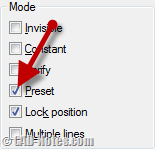
If you already have the block definition, you can easily modify it using block attribute manager (BATTMAN).
Working with multiple attributes
Now what if in the definition has several attributes? Let’s say we have two attributes: point number and point coordinate.
- We don’t want AutoCAD to ask the coordinate value.
- But we do want being asked the point number every time we insert it.
No problem. You can activate preset for coordinate attribute, but deactivate it for point number. When you insert the block, it will only ask point number, but not the coordinate.
This option is very useful when you use field in attributes. So you can prevent anyone to accidentally change it.
You can also consider to use this option for values that are common in your drawing. You can insert the block faster. And when you need to change the value, you can edit it after insertion.
Do you use preset attributes? If you do, what are you using it for?


use variable:
attreq = 0 Not input
attreq = 1
Thank you