In this Article...
Let’s continue our discussion how to use AutoCAD better.
We added several predefined settings in our template. Now let’s go further. We will set page setups, so we can use them for layout later.
Create your plot styles
Before we continue, let’s spend some time to create plot styles.
The common plot style AutoCAD users use is color dependent (CTB). But if you decided to use STB, you can follow this tutorial.
We need to define it first, because we want to include this information to our page setup.
Working with page setups
Page setup works with layout. I understand that not all drawings work best with layout. But in most situation, using layout has more advantages. If you think layout doesn’t work well for you, you may skip creating page setup. Please share your opinion about it in comment form below.
Why using layout?
Using layout offers you many advantages. I suggest you to read this 10 AutoCAD layout benefits list that I wrote if you haven’t used layout.
In short: it’s simple, intelligent, and easier to manage.
What is page setup?
Do you fill these settings every time you plot a drawing? If you do, you will love page setup.
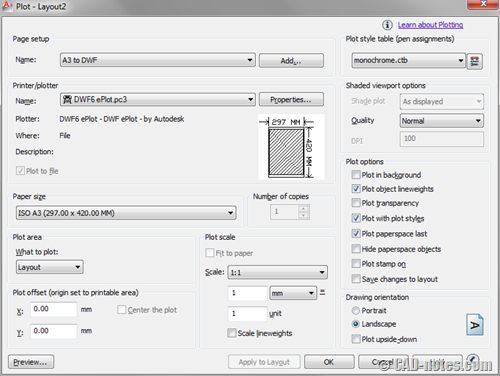
What’s the benefit?
You can save those settings to a page setup.
If you have 5 different plot settings, you can save it to 5 different page setups. So if you need to create a layout for A3 paper, you can quickly apply a page setup, without having to set anything else. It will use all values you set before.
You can use different page setups for different layout. It makes you possible to plot hundreds of sheets by a few clicks, without having to open the drawings.
Your task
You need to create several page setups now.
- If you use different paper sizes, then create page setups for each of them.
- If you use several printers/plotters, you may want to consider setting up page setup for them too. For example, you want to plot A3 and A4 paper to printer, but A1 size to plotters. By doing this you can quickly publish hundreds of sheets at once to several plotters!
- You may want to use different plot styles in your page setups.
- And so on
After you calculate your needs, you should try to keep them simple. It doesn’t make sense if you have 100 page setups in a template. You can try to separate them in several templates, or other workaround that you find convenient for your workflow.
Discussion

Now let’s discuss about plot styles and page setup.
- How many plot styles do you have? If you have several styles, what do you need them for?
- How many page setups do you have? How do you decided to create them? By paper size, plotters, or else?


AutoCAD users use is color dependent (CTB).
Hello Edwin,
I work for a manufacturing company and we do structural and ornamental railings.
Some times I need do long templates for the shop but the longest I can do is 24"x10ft
Can you explain how to do long print set up. i have an old KIP3000 plotter and I first make a PDF drawing and then send it to the protter. Can you help me on how to set long prints I need to set up a 30"x10ft 12ft 14ft 16ft 18ft and possibly a 20ft long plots
thank you
I agree with your opinion. Finally it depends on user's custom and experience, and print politics/solution in architectural firm.
Nice post Edwin, thanks.
1. How many plot styles do you have? If you have several styles, what do you need them for?
# We use about 6 CTB plot styles. Styles are named field of industry and scale for plotting, eg.: AEC_50, AEC_100.
2. How many page setups do you have? How do you decided to create them? By paper size, plotters, or else?
# We use just one page setup for plotter and actually I thing about adding another one for pdf or dwf print. In my humble opinion it's not ncessary have a lots of page setups by format for plotter in drawing. Most of plotter automatic recognize end of printed drawing and cut it. So my advice is 2 page setup by width of paper with assing long height.
Thank you PepaR,
When I worked for an architectural firm, we always have to plot to A3 printer and A0 plotter. I also see some companies have to plot to different paper sizes, like A4, A3, A1, and A0 for different purposes. Sometimes the project owners have different requirement for their projects.
You're the one who know which one work best for your need :)
These posts are fantastic. please keep them coming. There hasn't been much discussion yet, but I'm sure as the topics become more advanced more people will chime in. So far, you have been right on target. Please keep going at this pace.
Thanks again for your contributions.
Thank you Norm.
I hope there'll be more discussions here.
You can help by inviting your friends to visit these posts ;)