In this Article...
Let’s start a new chapter. We’re done with AutoCAD template in task 5. Start from this task, we will cover about reusable contents: using AutoCAD blocks.
Reusable contents in the past
Do you remember the good old days, when we use dry transfer to draw common objects in our drawing? That was before we use computer as design aid. When we draw manually.
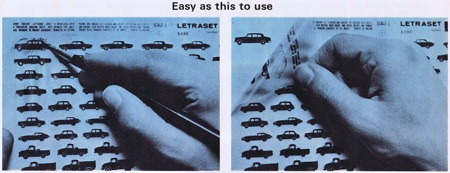
Image copyright: Gene Gable | creativepro.com
We can draw complex objects by transferring them to our drawings. It was fast, compared to manually draw the objects.
Reusable contents today
Today, we live in digital world. This is how the dry transfer looks now. Your blocks library.
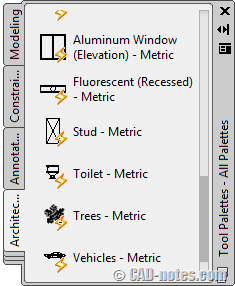
Yes, blocks.
Like the dry transfer, you can pick which object you want to use then put it in your drawing. You can purchase blocks, but mostly you can create your own library and use it repeatedly. And blocks are much more intelligent.
The benefits of using blocks are:
- You can easily use them repeatedly.
- They maintain your drawing standards. If you use blocks for annotation symbols, they will be the same in all drawings.
- You can add information to blocks. These information can be extracted for many purposes: You can create schedule automatically. You can create points coordinate report easily. If you’re in manufacturing industry, you can create hole tables. There are many things you can do by adding information to blocks.
Discussion

Image copyright: Yuri Arcurs – Fotolia.com
Before we step forward, now let’s discuss how you’re using blocks in your company.
- What kind of blocks do you have in your company? Common objects/standard parts, annotation symbols, title blocks, or anything else?
- Do you share your blocks with your colleagues? How do you do that?
- Do you think you already use them optimally? Do you think you need to update and optimize it further?
- What do you think the greatest benefit you get from using blocks?


1) We use blocks for annotating, title blocks, steel sections, trafic signs, common furniture and symbols for domestic apliances, baths, toilets, etc.
2) Best way is one place on server for update. Blocks are thematically sorted, it means each cathegory is one drawing. Everybody can open the file of import block by DesignCenter into the palletes.
3) We need to update some annnotations block for support annotation scales. Big disadvantage for us is using LT, which doesn't support Data Extraction.
4) Save time using repeating components. Support dynamic properties, data extraction, annotation scales, attributes. Block is nice replacement for groups. Nice tip is use block for draw window in facade. If is a lots of identical windows, you can put it as block. Investro can change their mind and need to edit classification or look of window. Now, you can replace or redefine current block of window.
– What kind of blocks do you have in your company? Common objects/standard parts, annotation symbols, title blocks, or anything else?
We use blocks for symbols for site civil work (manholes, power poles, etc.). Lots of them are dynamic for different visibility states or scaled for sizes.
– Do you share your blocks with your colleagues? How do you do that?
Blocks are on the server. I have created tool palettes on my local drive which I think save me lots of time. Others in the office don't use palettes.
– Do you think you already use them optimally? Do you think you need to update and optimize it further?
I am continually updating blocks: they change, are combined dynamically, or attributes added.
– What do you think the greatest benefit you get from using blocks?
Blocks are a time saver and keep the drawing looking professional by always have the symbol the same size and representation.