In this Article...
Let’s continue to work better with AutoCAD. Have you examined your drawings? Have you decided which objects that you use repeatedly?

Image copyright: © michael broon – Fotolia.com
In previous task, I’ve got good feedback from Neaton and PepaR. It’s good to see that you already using block intensively. I hope you who don’t give feedback also have used it too. Let’s discuss about reusable contents further.
If you have examined your drawing, let’s start creating blocks that you can use later in your next drawings.
Just for your further consideration, these are some common objects we can create as blocks.
Common objects
We usually create common objects as blocks. Common objects can be:
- Door, windows, furniture objects in architectural design.
- Standard parts and common parts in manufacturing design.
- Benchmark points, set out points, gully, etc. in civil design.
- Valve, pumps, etc. in P&ID diagram.
- And so on.
Benefits
Why do we create them as blocks? There are some benefits we can get.
- Less task to redraw the same objects repeatedly.
- It’s easier to choose objects without having to check the standard size. Even if you are new to the industry. Thank you Neaton for mentioning it.
- You can have standard objects presentation.
- Easier and faster to modify common objects. You only need to update/replace one definition. Doesn’t matter if you have dozens or even hundreds of similar objects, they are updated instantly. Designs always change, right? Thank you for PepaR for reminding me about it.
- Dynamic blocks also allows you to have standard objects with different sizes. Check this dynamic block for wall tutorial.
- You can also automate some process with some tricks. Check this door trick that ‘trim’ walls automatically.
- Block is countable and reportable. Unless you use AutoCAD LT, you can create reports using data extraction. Not only the number of blocks, also their properties.
Annotations
Another common objects we create as blocks are annotations.
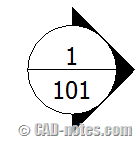
There are some common annotations that we can create as blocks:
- Tags. Elevation tags, material finish tags, and others.
- Title. View title, title blocks, room name, etc.
- Symbols. North symbol, benchmark points, weld symbol, etc.
- And so on.
Benefits
Now why would we want to use blocks for annotations?
- Again, less task to draw repeatedly and easier to choose standard symbols.
- The benefit you can have specifically for annotation is you can also set standard style. You can set annotations to have specific font type and size.
- If you use fields, you can make annotation more ‘intelligent’. For example this coordinate label that can update the value automatically.
- There are some ‘shared fields’ that you can use for every sheets in a drawing. And if you use Sheet Sets, you can even share the common values to all drawings in your project. See how we can create common values in AutoCAD drawing here.
Discussion
The main benefits of blocks is it reduces repetitive task, maintain standard, easier to modify, and make your drawing more intelligent.

Image copyright: Yuri Arcurs – Fotolia.com
Now, let’s discuss this topic again. Here are some topics we can discuss here:
- What’s the biggest benefits you have by using blocks at this moment?
- After you read what we can do with blocks above, do you think you can have more benefits from it? Things that you haven’t done, but you think can be useful?
- Do you create all objects in blocks in layer 0? And do you also use ByBlock properties? Why?
- Do you use fields in block attributes? What are they for?
- Do you use dynamic blocks and annotative blocks? Do you think they are good? Is there any downsides?


One of the first things I learned when creating dynamic blocks: If the block is annotative then the text isn't and if the block is not annotative then the text can be. Thanks PepaR, I'd forgotten about that problem. But I agree: the list of advantages is bigger than the disadvantages.
I mostly agree with Neaton, so I add some other remarks.
1. quick insert and multiple edit more inserts at once time, possibility to make schedule, …
3. I prefer 0 and ByBlock for easy individual change if I use layer system. By The way, if some unexperienced user try change color or linetype, He did it easy with ByBlock and this is better way instead explode block as usual.
4. A lots of. In spot heights, title blocks, print mark for drawing, measurement of area…
5. Sure, dynamic and annotative block make my CAD life much easier. I expected some improvements for new version of AutoCAD as possiblity for more visibility states. Actuall is there some limitations as working with wipeouts, lost grips in some situations, some issues if combine attributes and annotation scale (lost position of attribute), etc. So, final¨ly a list of advantages is bigger then disadvantages.
The best reason for blocks is you can insert or copy them quickly and they give accurate results which means less time spent on a drawing and therefore less money spent by the company. Time is money.
A dynamic block with visibility states allows you to change the appearance without having to delete it and replace it with another block. This can also reduce the number of blocks you need in your block library!
The only time I put objects on a layer other than 0 is if I want it on a no plot layer. We have a standard layer for this use. I don't put objects on Defpoints as AutoCAD recommends not to.
BYBLOCK can be useful if a block needs to be a different color or linetype than the layer it is put on.
Fields in blocks can be very useful since dynamic properties and values are field options. I created a dynamic pipe block that has text on a no plot layer that shows the length and size using fields. The block stretches to any length with visibility states for standard pipe diameters. This is very helpful in reviewing the file to be sure the correct size is used and for creating construction notes.
There are some drawback to fields in dynamic blocks. I have found that the fields for dynamic information become "#####" if brought in from a Tool Palette. If anyone has a solution I would like to know it! ATTSYNC and REGEN don't correct the field in this situation. Another drawback is if you redefine the block with a block that has a different number of visibility states the block gets confused and either reverts back to the first visibility state in the list or disappears altogether. I haven't tracked down exactly what is going on but it is something to watch for.
One caution I have is using wipeouts in blocks. Actually it is using wipeouts at all since they can print out as black on pdf plots. It is better to use a solid or dense associative hatch and a color with 1% screening so it prints white.
I think dynamic blocks are one the best enhancements that AutoCAD has made to the program. It allows users to do things that before had to be done by custom programming. I am always coming up with new ways to use dynamic blocks and am fortunate to own my own copy of AutoCAD so I can play with them at home and not feel I am wasting company time.
Thank you for sharing with us Neaton!
I thought the wipeout in pdf is because we use other pdf driver (like Adobe). I tried with pdf driver provided by AutoCAD and have no problem.
True, there are some problem with dynamic blocks. But I think there are more advantages, so we can't just ignore it.