May 26, 2013

How to: refer several sections to same section view

When we’re designing a project, there is a good chance that we will have same details, but in different locations. For example, we have same stair details on different locations. We need to place section to each location. But of course, it doesn’t make sense to create a detailed view for each location.

You can create one detailed view, and refer other section to the first view.

To do this, after you activate section tool, activate reference other view in option bar and choose view you want to use as reference.
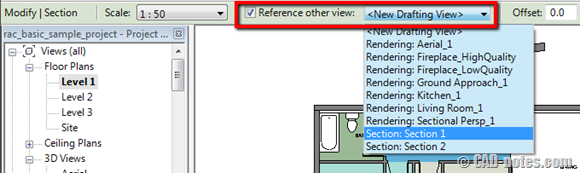
reference_other_view


This method works for sections, callout, elevation views, etc.

Advertisement


You might also interested to

About Edwin Prakoso

Edwin works as an Application Engineer in Jakarta, Indonesia. He has 4 years experience in building industry, then start to work for Autodesk reseller.
He is certified as Revit Architecture 2010 certified professional and AutoCAD 2013 certified professional.
He loves sharing his experience and starts to blog on CAD notes. Now using CAD is more to a lifestyle for him than working.
You can reach him on twitter @CADnotes. You can also connect with him on LinkedIn. If you prefer email, reach him at edwin.prakoso@cad-notes.com.

  • Alex Gore

    I use this all the time