In this Article...
Previously, we covered the new cloud sync feature in AutoCAD 2013. It works well if you always make changes to your settings when you are signed in. Let’s say you make some changes in one computer that sync to Autodesk 360. But you also make some changes to AutoCAD settings on your offline computer. That means you have two different settings. Which settings AutoCAD will recognize? Will it pick latest setting from both computers? No, you must choose which settings you want to keep.
When you have different settings between 360 and your computer
When you have different settings on different computer, Autodesk 360 will show an error message on title bar. It won’t do anything further until you confirm what you want. Click customization Sync error under your sign in name.
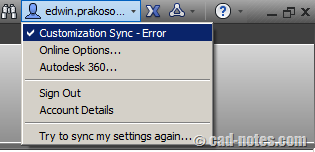
To sync or not to sync
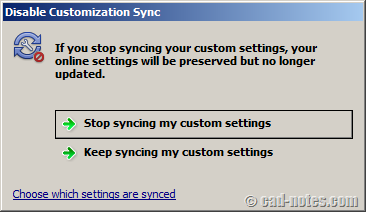
AutoCAD will offer you to stop syncing this computer or keep syncing with 360. If you choose to stop syncing, then AutoCAD will not do it anymore until you change it from online option.
If you choose to keep syncing, it will show another options. So which one you want to keep? The settings on your local computer or the one on the cloud?
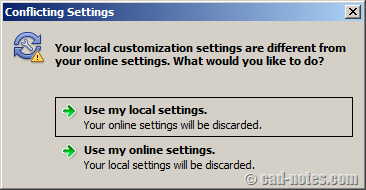
Whatever you choose, choose wisely. I would suggest you to backup your setting before you do this.
After you do above steps, but you still see the error message, you can try to sign out then sign in again. It works on my side. But I think restarting your AutoCAD will also work.


The simplest way to keep Autodesk Sync from running at all on your computer is to sign out of your Autodesk Account. You can tell if you are signed in because your Autodesk ID will appear in the InfoCenter (AutoCAD and Inventor) or in the status bar at the bottom of the main window.
The hotfix is now available. Download it here: http://usa.autodesk.com/getdoc/id=DL19683742
Don't forget to read the documentation how you can apply it.
Hi Prakoso !
How to fix this error when Autodesk 360 auto sync.
[IMG ]http://i281.photobucket.com/albums/kk213/codered8x/syncerr2.png[/IMG]
[IMG ]http://i281.photobucket.com/albums/kk213/codered8x/syncerr.png[/IMG]
Have you tried to click troubleshooting errors and see the error details? It could be your internet connection too.
I have tried to click troubleshooting errors and it directed to Autodesk 360 help site which show me there are 2 causes : internet connection and computer time zone. But my internet connection is fine and computer time zone is correct. I have also searched this problem by Google but I still haven't found any solves. Hoping you can fix it. Thank Edwin !
It looks like it's a known issue. I see several posts in forums that mentioning the same problem. I believe Autodesk will fix it the the next service pack/update.