In previous article, we covered how you can upload files to Autodesk 360 using AutoCAD. Now let’s cover a little how this integration actually works.
Let’s say you save a file directly to Autodesk 360. So does it mean that you open a file directly from your cloud storage? What if you have slow internet connection and working with large files? Will it affect performance? What if you suddenly disconnected from internet?
You always work locally
The truth is you never save to cloud storage. You save and open files locally. Autodesk 360 sync is the one working simultaneously updating your local copy with your cloud storage.
When you login and activate Autodesk sync, it creates a folder in your computer. It will replicate your online folder and files to this folder.
In Windows 7, the path should look similar to this:
C:\Users\YOUR_WINDOWS_ACCOUNT\AppData\Local\Autodesk\Autodesk Sync\Cloud\YOUR_AUTODESK_ID
OR you can use short link:
%LOCALAPPDATA%\Autodesk\Autodesk Sync\Cloud\YOUR_AUTODESK_ID
Update: In newer Autodesk application version, the link to Autodesk 360 folder is provided. You can access it directly from Windows Desktop or Windows Explorer.
What Autodesk 360 Sync does is synchronizing folder and files within this folder and your cloud files. Open the folder and compare it with your cloud documents.
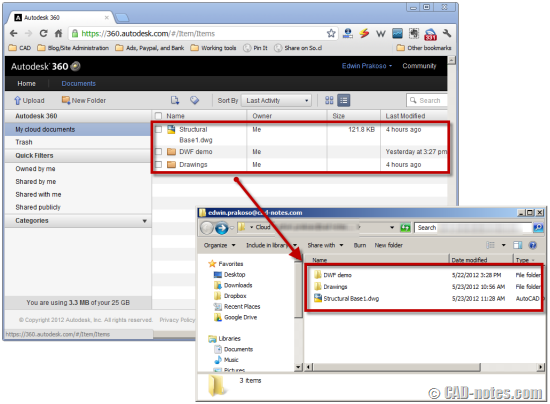
So you can work with slow or even no internet connection at all. But of course, to update and sync your files, you must connected to internet.
Copy file there to upload documents
You can upload multiple DWG from within AutoCAD using Upload Multiple button. But actually we can upload almost any file types to cloud storage.

But if you want to upload other types of documents (not DWG), you will need to open Autodesk 360 using browser and upload from there.
But now we know that’s not true. There is other way: Just copy your files in your local cloud folder. Every file you added there will be upload automatically.
What if you overwrite a file with newer version? It will upload the file and keep previous file as a version. Interested? We will cover about this later.
So this folder works very similarly with Dropbox. If you haven’t used Dropbox and want to give it a try, you can sign up for free here.
Disclosure: It’s a referral link. There is no cost you need to pay (unless you upgrade your free account), but I will get additional space if you signup.
Dropbox gives 2 GB of space for free, but Autodesk gives you 3GB for free! And if you are on subscription, you get 25GB! Isn’t that interesting? But of course, you will need to have AutoCAD installed on your machine. I don’t think we can install only Autodesk 360 sync without having any Autodesk product on our machine.
I think 360 is great!
Seriously, this is a very cool feature for AutoCAD. I thought creating section and details from 3D is the coolest feature, but after exploring this, I think this is better. What makes it better is it can manage revisions. Dropbox simply sync your files, but when you need older version of your document, Dropbox can’t provide it.
Update: Apparently Dropbox does support file versions. Thank you to Gustavo Fontana and Paul Munford who mentioned this.
Don’t you think this is cool?


Great post, Edwin!
I wonder how Autodesk 360 works when a file is shared with someone else and both persons are simultaneously are working with the same synced file locally? What happens when one saves the file? Do he/she receives a message that the file is being used by the other?
Regards, Edward
No Edward,
But I believe they are developing this on the next release. Have you tried Autodesk 360 Tech Preview? http://autodesk360.com/
Does anyone know if it is possible to store AutoCAD files on Dropbox and 360 simultaneously?
Do you happen to know how 360 works with AutoCAD Civil 3D data shortcuts?
I do think it is cool!
Great post Edwin,
Autodesk 360 is a great looking set of tools. And it's made for AutoCAD, so that's probably better than Drop Box for collaboration in the long run…
Just to be pedantic though, Drop Box does keep versions on file:  ;https://www.dropbox.com/help/11
Thanks Paul.
Gustavo also mention me about Dropbox file version on twitter. If we're talking about AutoCAD files, of course Autodesk 360 is better. It's integrated with Design Review, AutoCAD WS and AutoCAD ;) Plus I love the fact that I get 25 GB on my account :D
I'm curious how far Autodesk will take it. It will be great if it's also integrated with Vault.