• Home
  • Training Books
  • Subscribe to Our Email Newsletter
  • About
    • Contributors
    • Feedback
    • Contact
    • Privacy policy
    • Cookie Policy

CADnotes

CAD Tutorials and Best Practices for professionals and students

  • Featured
  • AutoCAD
    • AutoLISP
  • Revit
    • Revit Architecture Basic
    • Revit MEP Basic Tutorial
  • Inventor
  • MicroStation
    • MicroStation Basic Tutorial
You are here: Home / AutoCAD / Having problem viewing AutoCAD layer manager palette?

Having problem viewing AutoCAD layer manager palette?

June 27, 2012 by Edwin Prakoso 1 Comment

In this Article...

Toggle
  • How can we use old layer properties manager dialog box?
    • Using CLASSICLAYER
    • Changing LAYERDLGMODE

I don’t remember when exactly Autodesk introduce layer properties manager as a palette. It does have benefits because we can create layers or change properties on the fly. We don’t have to close it to continue working like using old dialog box.

However, I’ve seen some users have problems with it. I assume this has something to do with graphic cards. They are probably not certified.

I also see that if they use old dialog box, then it works as usual. So this is a workaround if you have similar problem. I also see several users prefer using dialog box than palette for other reasons.

How can we use old layer properties manager dialog box?
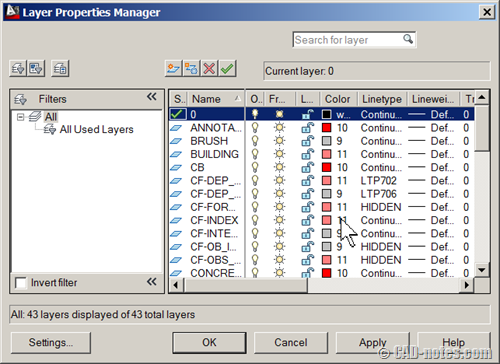
layer manager

There are two ways to use layer manager dialog box:

  1. Using CLASSICLAYER command.
  2. Change LAYERDLGMODE variable to 0.

Using CLASSICLAYER

This command will open dialog box, not palette. But if you use _LAYER command or click the button from ribbon/toolbar, it will still open layer palette.

Changing LAYERDLGMODE

If you change the LAYERDLGMODE to 0, then AutoCAD will open dialog box, doesn’t matter how you access the layer manager.

So if you have problem with palette, or you just like the old way… you know how to use dialog box!

Share the knowledge:

About Edwin Prakoso

I work as a Sr. Consultant in PT Cipta Satria Informatika. I've been using AutoCAD since R14 and Revit since Revit Building 9. I occasionally write for AUGIWorld magazine and I am also active in Autodesk discussion forum. I'm a member of Autodesk Expert Elite, an appreciation for individuals who give contributions to the Autodesk community.
Connect with me on twitter or LinkedIn.

Filed Under: AutoCAD Tagged With: autocad tips, layer manager, palette

0 0 votes
Article Rating
Subscribe
Login
Notify of
guest

guest

This site uses Akismet to reduce spam. Learn how your comment data is processed.

1 Comment
Teresa Kawaguchi
Teresa Kawaguchi
11 years ago

You are awesome! Your site has helped me numerous times. I truly, deeply appreciate the time you put into the site.

0
Reply
wpdiscuz   wpDiscuz

Featured

3 Things Orient to View in Revit can do for you

Revit orent to view tool might be overlooked. But it can be very helpful to help you work with large and complex models. Here are 3 benefits that you can get right now.

Recent Articles

  • Automation is not AI
  • BIM Doesn’t Fix Your Problems
  • BIM is Useful, Until It’s Not

Advertisement

New on CADnotes

  • Automation is not AI
  • BIM Doesn’t Fix Your Problems
  • BIM is Useful, Until It’s Not
  • AI-Powered Rendering Now Available in Forma Board
  • Autodesk Forma Is Not The New Name For ACC

Meet the Authors

avatar for
avatar for
avatar for
avatar for
avatar for
avatar for

Get Connected

CADnotes on FacebookCADnotes on InstagramCADnotes on TwitterCADnotes on YouTube

© 2009 – 2026 CADnotes · Feedback · Privacy Policy · Become an affiliate

In this Article...

×
  • How can we use old layer properties manager dialog box?
    • Using CLASSICLAYER
    • Changing LAYERDLGMODE
→ In this article...
wpDiscuz