Have you ever forget to change current layer when drawing your objects? You will need to move several objects to another layer. In this tutorial, we will see several ways to do it.
This is quite a basic knowledge of AutoCAD, but I see that this question is frequently asked. So let’s explore all tools that can do this, probably experienced users may find other tools more convenient.
Let’s see the options.
Using layer list dropdown or properties palette
This is the common way we do. At least for old school AutoCAD users like me.
First, select objects you want to move to other layers.
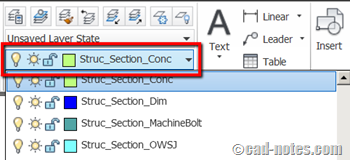
On AutoCAD ribbon, layer panel, click the layer list dropdown. Select new layer to move the objects to a new layer.
If you don’t select object, this action will change current layer.
Similar to above method, you can select the layer on properties palette. Press [ctrl] + [1] to open properties palette.
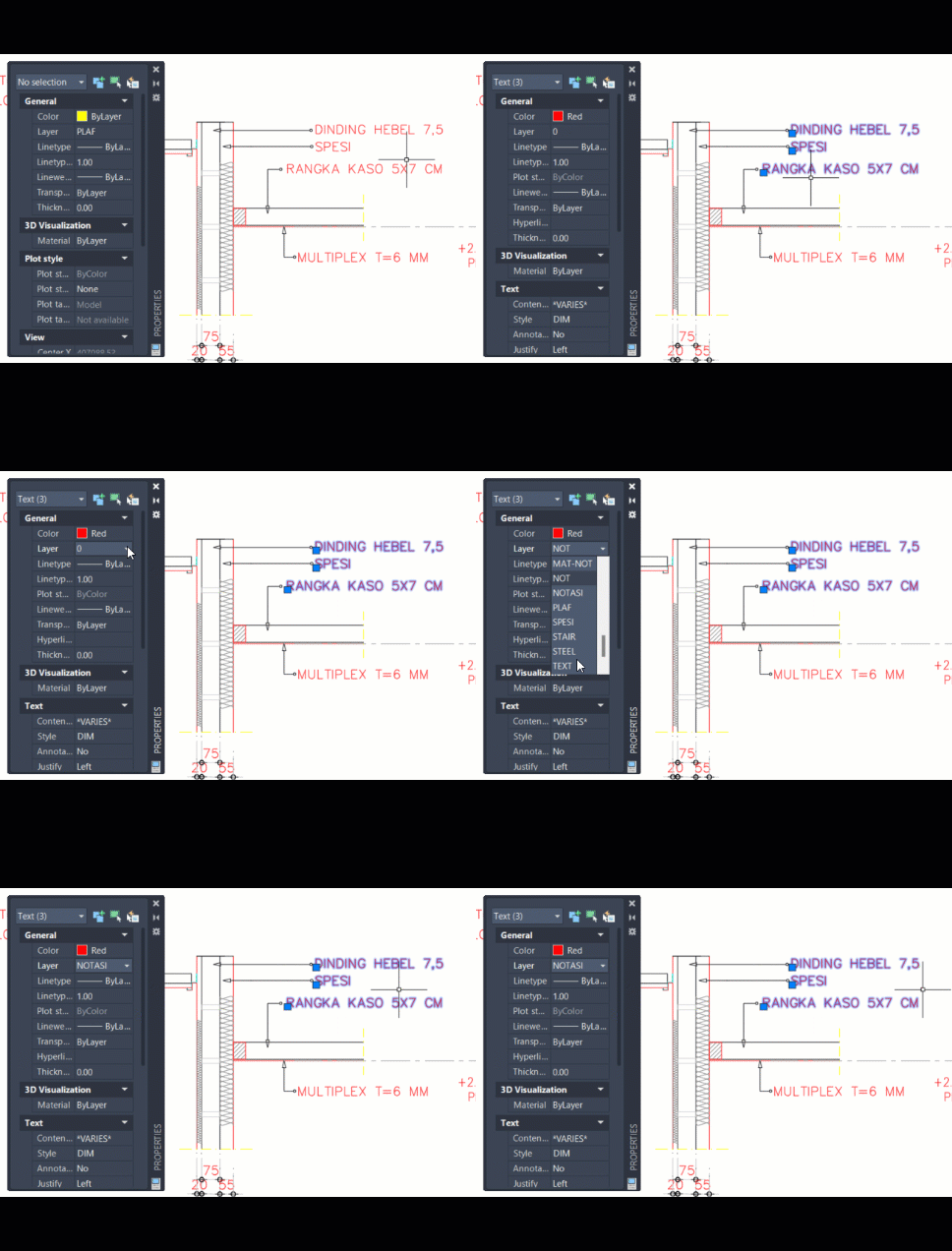
If this doesn’t work, you need to check PICKFIRST system variable like described here.
Change to current layer
Before using this tool, change current layer to a layer you want.
Activate change to current layer then select objects you want to move. Press [enter] after you finish object selection.
You need to expand layer panel to find this tool.
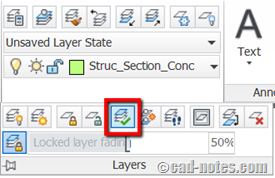
For AutoCAD command line junkie, you can type LAYCUR to activate this tool.
Using match layer tool
I use this tool frequently. Instead of selecting a layer from the list, you can select an object. Your object will be moved to the same layer as referenced object.
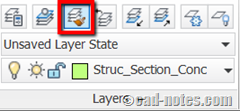
After you activate this tool, select objects that you want to move. After you finish with the selection, press [enter]. Select an object on a layer you want as a reference.
There is match properties tool that can match every property that possible. And you can set it to match selective properties only, such as a layer. But if you only want to match layer, this is a better tool.
For command line junkie, type LAYMCH to activate this tool.
Which is your favorite method?
So which one is your favorite method? Do you have another way to move objects to another layer? Share with us!


None, when labeling it should be an option of current layer instead of all that work, that’s one of the plus in Carlson
HOW TO RE EDIT THE TEXT IN THE SAME LOCATION WITHOUGHT DISTURBING TEXT JUSTIFICATION
HOW to give two layer for one object or text
Hi. i have problem with move block to another layer auto cad .i did every thing that you said but my block dont move. in layer pro show the block that i move in my current layer but when i turn off the lamp (current layer) my block dont disappear. can you help me
I believe the objects that make the blocks are not on Layer 0. Try to open the block in Block Editor and check the objects layer.
Thaks a lot man, appreciate
On Layer Properties Manager > Select Layer on which Objects are placed > Right click > Isolate Selected Layers > Select all the objects you want to move and move to desired Layer using one of the above-methods.
This is just turning on / off the layers which we don’t want leaving the layer in which the objects we want to move, on. To turn them on again, select all layers (Ctrl + A while in the Layer Properties Manager) then click on the Light bulb icon.
Another useful method, for example if you want to move all objects from a certain layer no matter what’s on the layer, you can Merge it to the desired layer. Double click on a random layer to make it current (not the one you want to merge) then Right-click on the layer you want to merge > Merge Selected Layer(s) to > a Merge to Layer menu will popup > Select desired Layer > click on OK.
thank you… it helps
Thanks for the info, but I’m still disappointed with these being the only options. It’s ridiculous to be that there is no command to bring up a quickly searchable list of layers to switch an object or objects to. Instead the only option is a drop down list? Drop down lists are soooo inefficient. Love a lot about Autocad but sometimes i’m left scratching my head.
You can use command line if you want. You can create a macro to make it faster.But yes, you need to know the layer name.
Command: CHPROP
Select objects: 1 found
Select objects:
Enter property to change [Color/LAyer/LType/ltScale/LWeight/Thickness/TRansparency/Material/Annotative]: la
Enter new layer name <0>:
Being self taught, I have big gaps in my skills and this was one of them. Get in a hurry and forget to change layers and have to clean things up later. Tried all three methods and they worked fine with CAD 2014. Thanks for the clear and simple text with supporting graphics.
This is a very big bug. Color change of an object clearly does not work properly or reliably.
The three ways to change an object to a layer, and none work. Even the tutorial reads like try this or try that if it doesn’t work, there is no clear approach that works. Why is ACAD not fixing obvious bugs.
Clearly if you select an object, you should be able to assign it to the current layer in the Layer Manager.
Yet the three ways make it seem like rocket science to do the simplist task. Fix the darn software so it works.
The difficult stuff should not involve copying an object to a layer. I am using acad 2007 lt.
This is not because I am a beginner this is because the software is not working.
That is a known issue. You need to repair the installation.
Usually that issue was caused by registry cleaner (like CCleaner). Try to repair it and see if it fix the “bug”.
I have read your tutorial and find it does not explain enough to use layers, or even know how layers work. Following your instruction, objects were selected, but they just disappear and reappear randomly.
You are obviously operating with a lot of hidden assumptions, i.e., making a series of probably-true statements about layers, but falsely assuming that the reader knows as much as you do and can fill in all the info that you are not explaining.
I have no clue how to assign object to layers and have the layers I want displaying.
There is a light bulb, on the left of the tab, that offers a window that says "Turns a layer on or off", but I never know if it is on or off, or how to turn it on or off. A series of almost random true statements does not explain the subject. The more I read the more confused I get.
Part of the problem is that AutoCAD is terrible and unintuitive software,that has been modified millions of times at the margin and not rewritten from scratch periodically.
Yay! I am glad I am not alone in finding autocad unintuitive, and wishing this explanation was a LOT more detailed, and was filling in all the seemingly-obvious steps that to a raw beginner are not obvious at all.