
You can check whether your hardware are certified to run Autodesk products or not. You probably already know that. You can check certified hardware here: autodesk.com/hardware.
However, you may still have problem with graphic performance. So what could be wrong?
First, you should realize that the certification are released for workstation grade hardware. It’s clearly stated in the hardware certification page. I really don’t think this would be an issue. Certainly non-workstation grade will work slower, but shouldn’t be any serious issue.
Second, the certifications are released for specific driver version. If your graphic card is listed but you don’t use the same driver version, it could be trouble. Latest driver doesn’t mean it would be better.
So if you already use certified graphic card but still having problem, you should try to download the driver from Autodesk website. Replace your driver with it.
How do I download the driver?
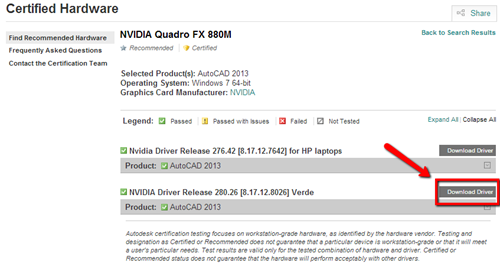
Go to Autodesk certified hardware page. Find your graphic card in the list. When you find it, click the graphic card name.
In the detail page, you can see the download link like in screenshot below.
It’s not a common issue. I only see one issue with AutoCAD when latest driver is installed.
This is also suggested by other CAD vendor (not only Autodesk products).


As an FYI, the link in the email newsletter does not work (though the one in the article above works fine.