If you have different versions of AutoCAD in your office, you might have this problem. AutoCAD 2013 has changed the file version (we all already know it), it means lower versions can’t open it.
The same thing happens if updated your template file with AutoCAD 2013. You open your template file, modify it then save it.
If you share the templates with your coworkers, they who use AutoCAD 2012 or older will not be able to use it.
AutoCAD does allow you to save to older version. However, it only have versions for DWG but only one DWT. It means you can’t save it to lower DWT version, and your coworker can’t open it using AutoCAD 2012.
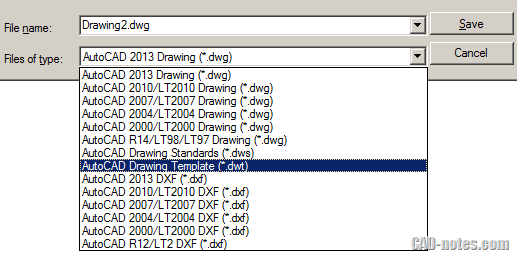
So how you can save to AutoCAD DWT 2010?
DWT is actually DWG file. Autodesk just use different file extension to differentiate a drawing and a template.
You can save the template as AutoCAD 2010 drawing. Then you can change the extension in Windows Explorer from DWG to DWT.


How can I save a template to a back version template. I have tried what you have outlined above, but our other programs won’t take AutoCAD 2016 files. I automatically save my .dwg files to 2010.dwg. I tried saving the template as a .dwg 2010 file. Then opening it and then saving it off as a template. It WILL NOT work in our systems. I have a bunch of template drawings, what are we to do? Do I just have to save them as .dwg and have everyone go in and rename them where they call out .DWT ????
If you save the template as DWG 2010, can your colleague open it? If yes, simply change the file extension to DWT. You need to do this in Windows Explorer.
Make sure your system doesn’t hide the file extension.
Is there are way to get the files created from the template to automatically be set to the 2010 version instead of the 2013 version? It seems as though following the process above only allows the template to be used by both versions, but a DWG created with the 2013 version, even if it is from the "2010 template", will not open with the 2010 version unless itis manually downsaved. Thanks.
Hi CADguy,
You can set AutoCAD to save to specific version. Try to read this: https://www.cad-notes.com/2009/07/how-to-set-a-pre…
This is another great tip, and one that I will use. Keep up the great articles!